How to stop A/B test flicker (without tanking Core Web Vitals)
Flicker, or flash of original content, is the half-second where a visitor sees the control before your variation paints over it. It happens because your code runs after the browser has already shown the original. The fix is to hide only the element you are about to change until you have changed it, with a short timeout failsafe so a slow test never leaves the page blank. The page-wide hide most tools ship by default stops the flicker but wrecks your Largest Contentful Paint. Scope the hide and you get neither problem.
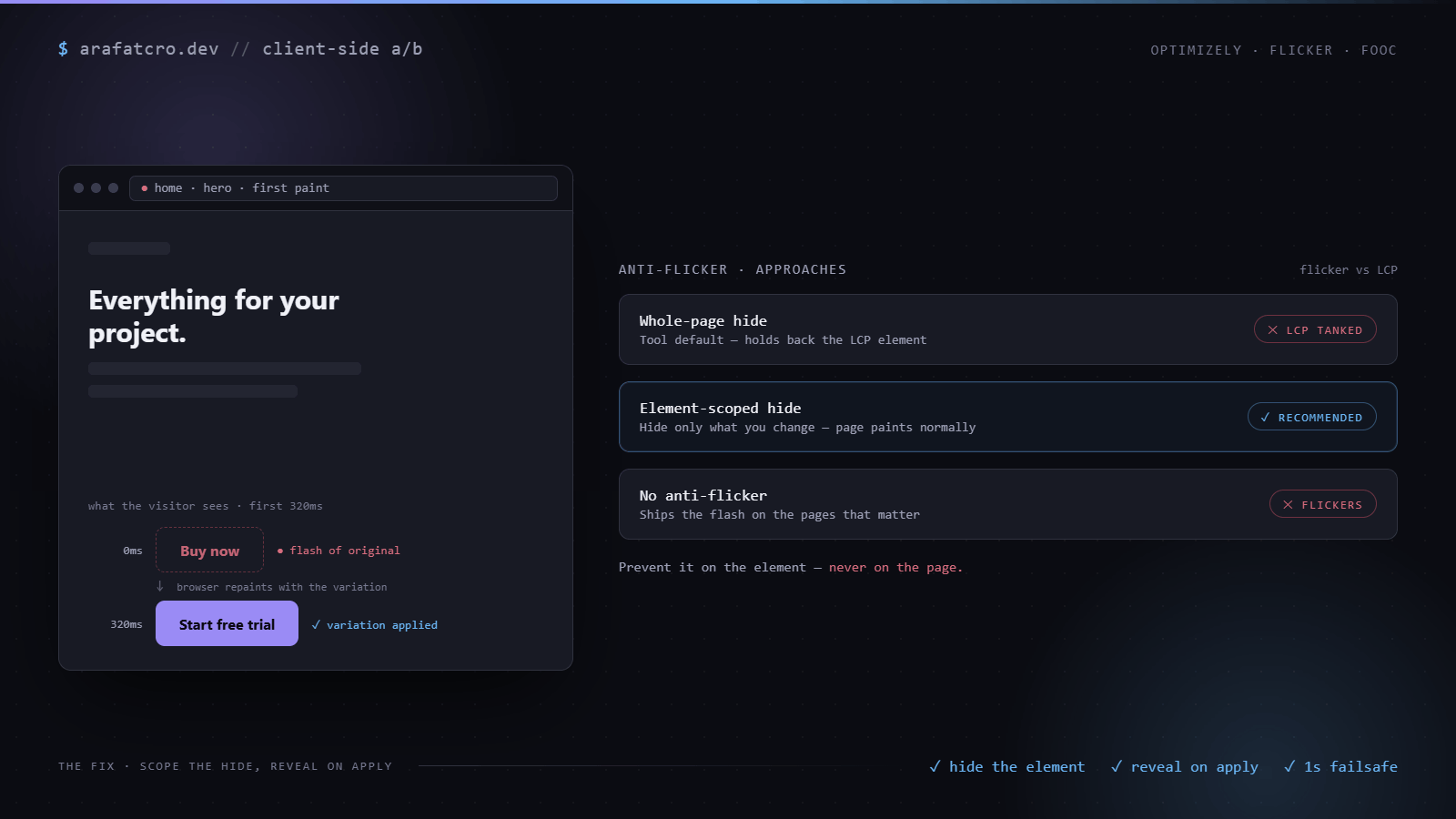
Why flicker happens
Your test tool loads, reads which variation the visitor is in, and applies the change with JavaScript. All of that takes time, and the browser does not wait for it. It paints the page it already has, the original, and only then does your code overwrite it. That gap, often a few hundred milliseconds, is the flash. It is worst on exactly the elements that matter: a headline, a hero button, a price, because those paint early and your change lands late.
The lazy fix that tanks your vitals
The one-line answer every tool offers is to hide the whole page until the test is ready, then reveal it. It does stop the flicker. It also hides your Largest Contentful Paint element, the biggest thing on screen, behind the snippet, so LCP cannot complete until the test loads. You have traded a visible flicker for an invisible performance tax that Google measures and ranks on. On a slow test, or one that errors, the visitor stares at a blank page until the failsafe fires.
The fix: hide only what you change
Hide the specific elements each variation touches, not the document. The rest of the page, including the LCP element, paints normally. Reveal the moment you have applied the change, and keep a short timeout failsafe so a slow or broken test reveals the element anyway rather than leaving a hole. Pair it with a proper wait for the element (the waitForElement helper from that guide) so you reveal exactly when the change lands.
// Element-scoped anti-flicker. Reveal on apply, or after a 1s failsafe.
// Hide only the elements you are about to change; reveal on apply or timeout.
function hideUntilApplied(selector, { timeout = 1000 } = {}) {
  const style = document.createElement('style');
  style.textContent = `${selector}{visibility:hidden!important}`;
  document.head.appendChild(style);
  const reveal = () => style.isConnected && style.remove();
  const failsafe = setTimeout(reveal, timeout);
  // call this once you have applied the variation
  return () => { clearTimeout(failsafe); reveal(); };
}

// usage
const reveal = hideUntilApplied('[data-qa="hero-cta"]');
waitForElement('[data-qa="hero-cta"]').then((el) => {
  el.textContent = 'Start free trial';
  reveal();
});
Use visibility:hidden, not display:none: it holds the element's space, so revealing it does not shove the layout and trigger a layout shift, which is its own Core Web Vitals problem.
How this played out on a real build
This site shipped with a tool's default anti-flicker that hid the entire page until the experimentation script loaded. It killed the flicker and it killed the Largest Contentful Paint with it: the hero, the headline, the thing the page exists to show, all held back behind the snippet. Removing the page-wide hide took Total Blocking Time from 350ms to nothing and cleared the LCP stall on the lab trace. The lesson is not "never prevent flicker." It is "prevent it on the element, never on the page."
Anti-flicker approaches compared
| Approach | Stops flicker? | LCP cost | Use when |
|---|---|---|---|
| Whole-page hide (tool default) | Yes | High: hides the LCP element | Almost never on content pages |
| Element-scoped hide | Yes | Low to none | The default for any visible change |
| No anti-flicker | No | None | Below-the-fold or non-visual changes |
By platform: Optimizely ships a page-hiding snippet you can scope or switch off, VWO's SmartCode has the same setting, and Adobe Target's at.js prehiding is page-wide by default. In every case the move is the same: scope it to the elements you touch, or carry your own element-scoped hide.
Common questions
What causes flicker in an A/B test?
The browser paints the original page before your variation code runs, so the visitor sees the control for a fraction of a second before it changes. It is a race between the page rendering and your script applying the change.
Does an anti-flicker snippet hurt Core Web Vitals?
A whole-page snippet does, because it hides your Largest Contentful Paint element until the test loads. An element-scoped hide does not, because the rest of the page paints normally.
How long should the anti-flicker timeout be?
Short, around 1000ms. It is a failsafe, not the plan. If the test has not applied within a second, the visitor should see the real element rather than a held-back blank.
Should I hide the whole page or just the element?
Just the element. Whole-page hiding is the one-line default, but it tanks LCP and risks a blank screen on every test. Scope the hide to what each variation touches.
The short version
Flicker is a race you lose by default. Do not fix it by hiding the page, that just moves the cost into your vitals. Hide the elements you are changing, reveal them the moment the change lands, and keep a one-second failsafe so nothing ever stays blank.