Frequency capping: show your popup once, not on every page
The variation works. The overlay shows, the offer lands, the test is live. Then the same visitor opens a second page and sees it again, and a third, and by the fourth they are not reading it, they are hunting for the close button. A popup with no memory is not a campaign, it is a tax on every page view. Frequency capping is the small bit of state that turns it back into a save.
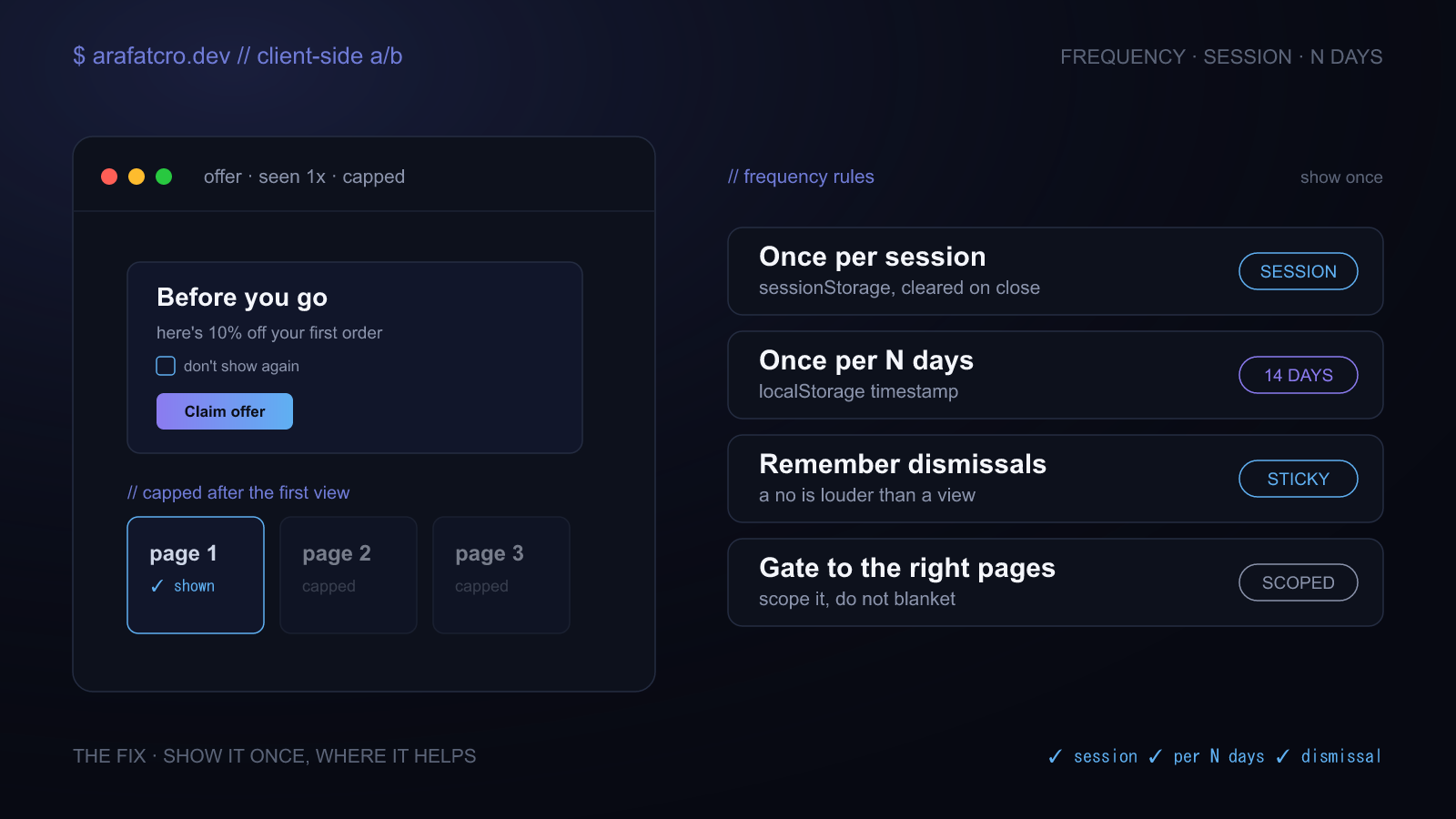
The popup that will not quit
A variation that shows something once is easy. The trouble starts on the second page. Client side test code runs fresh on every page load, so unless you leave a record behind, the overlay has no idea it already appeared. The visitor gets it again on the next page, and again after they close it, and the thing you built to help them becomes the reason they bounce. It also wrecks your data, because now you are counting four impressions for one person and cannot tell a real view from the third nag.
Two clocks: per session and per N days
Frequency capping comes down to where you keep the record and how long it lasts. A per session cap uses
sessionStorage, which the browser clears when the tab closes, so the visitor can see the
popup again on their next visit. A per N days cap stores a timestamp in localStorage or a
cookie with an expiry, so it stays suppressed across visits until the window runs out. Reach for
session when it is a soft, once-a-visit nudge, and for N days when it is something you only want to put
in front of someone occasionally.
// Two caps, both self-contained and fail-open if storage is blocked.
function allowOncePerDays(key, days = 7) {
  const name = `fc_${key}`;
  try {
    const until = Number(localStorage.getItem(name) || 0);
    if (Date.now() < until) return false;            // still inside the window
    localStorage.setItem(name, String(Date.now() + days * 864e5));
    return true;
  } catch (e) {
    return true; // storage blocked: do not suppress
  }
}

function allowOncePerSession(key) {
  const name = `fc_${key}`;
  try {
    if (sessionStorage.getItem(name)) return false;
    sessionStorage.setItem(name, "1");
    return true;
  } catch (e) {
    return true;
  }
}
Both return true the first time and false after, so you gate the popup inline:
if (allowOncePerDays("offer", 14)) showOverlay();. They are part of
ab-test-helpers,
and they fail open on purpose: if storage throws in private mode, a visitor still gets to see the test
rather than being silently locked out.
Remember the dismissal, not just the view
Having seen a popup and having closed a popup are two different signals, and the second one is louder. Someone who hit the close button is telling you no, so write that down separately and respect it for at least the session. Keep it apart from the show cap, because you often want a plain view to refresh after a few days while a dismissal sticks harder.
// Cap the show, and honour an explicit dismissal on top of it.
function maybeShowOffer() {
  // an explicit "no" persists for the whole session
  if (sessionStorage.getItem("offer_dismissed") === "1") return;
  // and beyond that, only once every 14 days
  if (!allowOncePerDays("offer", 14)) return;
  showOverlay();
}

closeButton.addEventListener("click", () => {
  sessionStorage.setItem("offer_dismissed", "1");
  hideOverlay();
});
Cookies or Web Storage
For a cap that only the page needs, Web Storage is the simpler choice and it does not ride along on every network request. Switch to a cookie when something outside the page has to read it, like suppressing the same message in an email or on a server-rendered version of the page. Both survive a reload. The cookie is the one that travels to the server, and the one you can give a clean expiry.
// A cookie cap, for when the server needs to see it too.
function setCookie(name, value, { days = 30, path = "/", sameSite = "Lax" } = {}) {
  const date = new Date();
  date.setTime(date.getTime() + days * 864e5);
  document.cookie = `${name}=${encodeURIComponent(value)}; path=${path}` +
    `; SameSite=${sameSite}; expires=${date.toUTCString()}` +
    (location.protocol === "https:" ? "; Secure" : "");
}

function getCookie(name) {
  const m = document.cookie.match(new RegExp("(?:^|; )" + name + "=([^;]*)"));
  return m ? decodeURIComponent(m[1]) : null;
}
Gate it to where it belongs
A cap controls how often, but you still decide where. A "before you go" offer that makes sense on a product page is noise on the checkout. Gate the show to the page types the test is actually about, and keep that check next to the cap so the popup never renders where it was not meant to, even if the trigger fires there. The tighter the scope, the cleaner the result.
How this played out on a real build
This was the show logic behind an exit-intent overlay I built for Screwfix on product listing and
product pages. The detector fired at most once per session, and the modal itself ran through a single
gate before it ever rendered: it checked a sessionStorage dismissal flag, confirmed the
visitor was on a listing or product page, and only then built the overlay. So a shopper who closed it
did not see it again that session, and someone browsing through ten pages got it once, on the page
where it was relevant, not on every step. The capping was not an afterthought bolted on at the end. It
was the gate every render had to pass. The full case
study covers the rest of the build.
Frequency-capping approaches compared
| Approach | Survives reload? | Survives a return visit? | Use when |
|---|---|---|---|
| No cap | No | No | Almost never, it shows on every page |
| Once per session (sessionStorage) | Yes | No, clears on tab close | A soft, once-a-visit nudge |
| Once per N days (localStorage or cookie) | Yes | Yes, until the window passes | Something shown only occasionally |
| Per user (server, logged in) | Yes | Yes, across devices | When you have an account to key it to |
Common questions
How do I stop a popup showing on every page?
Frequency cap it. Record that the visitor has seen it, in storage or a cookie that survives navigation, and check that record before showing it again. Fire the trigger once per session too, so a single page view cannot show it twice.
What is the difference between once per session and once per N days?
Once per session uses sessionStorage, cleared when the browser closes, so it shows again on
the next visit. Once per N days uses a timestamp in localStorage or a cookie with an
expiry, so it stays suppressed across visits until the window passes.
Should I use cookies or localStorage for frequency capping?
Use Web Storage for a purely client side cap, since it is simpler and does not travel on every request. Use a cookie when the server or another system needs to read it. Both survive reloads; only the cookie is sent to the server.
How do I remember that a user dismissed a popup?
Write a separate flag when they close it, like sessionStorage.setItem("dismissed", "1"),
and check it before showing again. Keep it apart from the show cap, because a dismissal is a stronger
signal than a plain view.
Does frequency capping work if cookies are blocked?
Web Storage can throw in private mode, so wrap it in try/catch and fail open: if you cannot read the cap, allow the popup rather than trapping the visitor unable to see anything.
The short version
A popup needs memory. Cap the show with a session flag or an N-day timestamp, honour a dismissal separately and harder, gate it to the pages it belongs on, and fail open when storage misbehaves. That turns a popup that nags into one a visitor sees once, where it helps.