Optimizely vs VWO vs Convert for developers
Optimizely is the most engineered of the three, with the best QA tooling and a mature stats engine, and it is for teams that can absorb the price and weight. VWO is the gentlest on-ramp and the broadest all-in-one, and it is for teams who want testing plus heatmaps and surveys without living in code. Convert is the most transparent on statistics and the most openly code-friendly, and it is for a developer who wants to ship arbitrary code and actually understand the math, in exchange for the smallest ecosystem.
I build A/B tests on all three of these platforms and have no affiliation with any of them. Last verified 23 June 2026.
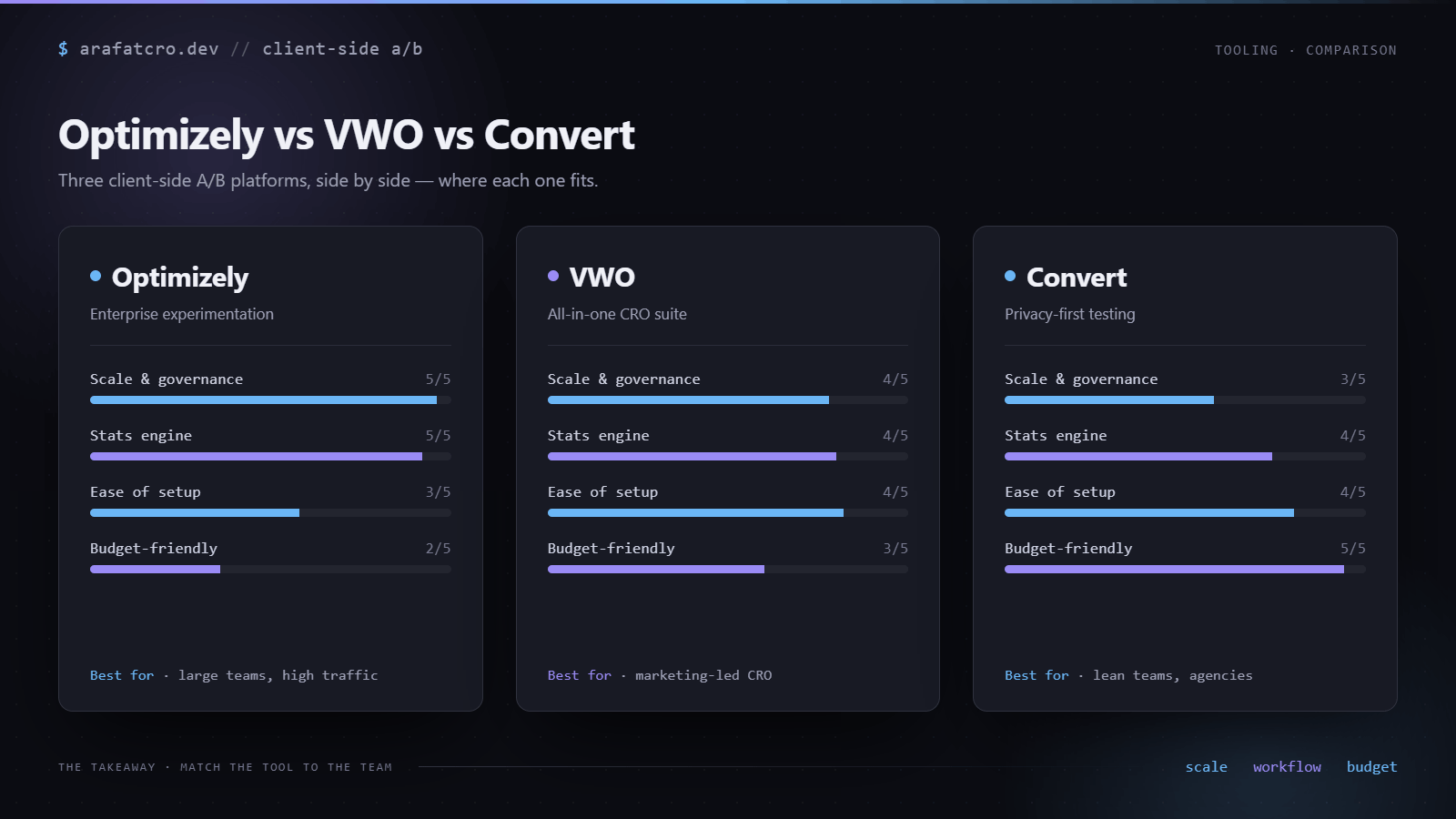
At a glance
| Dimension | Optimizely | VWO | Convert |
|---|---|---|---|
| Load & anti-flicker | Synchronous, high in the head, so changes apply before first paint. | Async or sync; async shield averages about 110ms and can target one element. |
Synchronous by default with a built-in shield. |
| SPA route changes | Conditional activation plus waitForElement and waitUntil to re-activate. |
Virtual page load API re-runs page matching on a route change. | Re-evaluates on history.pushState; you undo your own DOM changes. |
| Custom-code freedom | Apply JS and Reset JS, project and experiment scope; arbitrary JS runs. | Raw JS and CSS exist, but the visual editor is the default path. | Five code editors from project to variation scope. The most open. |
| Activation & targeting | Polling or callback conditional activation, plus a manual activate API. |
Rich audience targeting; virtual page load is the programmatic trigger. | JS-condition locations plus executeExperiment to fire manually. |
| QA & debugging | First-class query params: force-bucket, disable, impersonate, log levels, preview. | Preview mode and a debugger; force-into-variation URL param not confirmed. | Chrome debugger extension plus a QA overlay across URLs and devices. |
| Results & stats | Stats Engine: always-valid sequential testing with false-discovery control. | Bayesian SmartStats with a sequential option; user-controllable config. | Three engines (fixed, sequential, Bayesian) you pick per experiment. The most transparent. |
| Local dev & versioning | Upload code from a GitHub repo via a GitHub Action, plus REST API. | REST API exists; no first-party git or local-dev loop in the docs. Weakest here. | Full REST API, a version-control widget, and an MCP server. |
1. How test code loads and anti-flicker
Optimizely's one-line snippet is designed to load synchronously and high in the head, so variation DOM changes apply before first paint. To suppress flicker it hides elements with visibility:hidden and the client removes that rule once it has applied the synchronous changes. Place the snippet async or low on the page and visitors briefly see the original, which contaminates the control.
VWO's SmartCode comes in async and sync flavors. Async loads in parallel and uses an anti-flicker shield that hides the page body, or a configurable element via the hide_element field, until changes apply, averaging about 110ms. You can tune the timing with settings_tolerance and library_tolerance. The sync flavor loads in a single cached request for tighter control over timing.
Convert's snippet carries a built-in anti-flicker shield and loads synchronously by default, so changes apply with no flash of original content.
The practical lesson is the same across all three: the Core Web Vitals cost comes from a page-wide hide, not from the brand on the snippet. Scope the hide to the elements each variation touches. I cover that tradeoff in stopping A/B test flicker without tanking Core Web Vitals and the wider load-cost picture in A/B tests and Core Web Vitals.
/* The Core Web Vitals cost is the page-wide hide, not the brand. Scope it. */
/* Hide only the elements a variation will change, not the whole page. */
.hero-headline,
.pricing-table { visibility: hidden; }

/* The platform's anti-flicker shield reveals them once the variation applies.
   On VWO, point hide_element at these selectors instead of the default body. */
2. SPA and framework route changes
This is where client-side platforms tend to break, and each one solves it differently. On Optimizely you use conditional (manual) activation plus the utils helpers window.optimizely.get('utils').waitForElement(selector) and waitUntil(condition) to re-activate experiments after a client-side route change rather than relying on the initial page load. Optimizely also publishes framework guidance for React, Gatsby, and SSR with hydration.
VWO exposes a virtual page load API for SPAs that re-runs campaign page-matching and qualification when a route changes without a real navigation. The docs phrase it as an activate push with a virtual page URL, for example window.VWO.push(['activate', { virtualPageUrl: '/new-page' }]). Copy the exact namespace and argument form from VWO's live reference before you ship, since that call shape can change.
On Convert, the platform re-evaluates all locations and goals when history.pushState or history.replaceState fire, so experiments can re-trigger on client-side navigation. If auto-detection misses, you can force a re-check; the docs give the form window._conv_q.push(["run", "true"]), so confirm the current call shape against Convert's reference before you ship. One catch worth knowing: DOM changes from a variation are not auto-reset between virtual pages, so you undo them yourself. Convert recommends a JS condition over a URL match for SPA routes.
// Re-activating an experiment after a client-side route change
// Optimizely: re-activate with the utils helpers after the route changes.
window.optimizely.get('utils').waitForElement('.new-route-target');
window.optimizely.get('utils').waitUntil(() => location.pathname === '/checkout');

// VWO: virtual page load re-runs page matching. Confirm the exact call
// shape against VWO's live reference before you ship.
window.VWO.push(['activate', { virtualPageUrl: '/checkout' }]);

// Convert: re-evaluates on history.pushState / replaceState automatically.
// Force a re-check if auto-detection misses (confirm the current shape):
window._conv_q.push(['run', 'true']);
// It does not auto-reset a variation's DOM between virtual pages, so undo it yourself.
The shape of the problem is the same one I walk through in why an experiment stops firing on SPA route changes. Optimizely gives you the most explicit re-activation API; Convert is the most automatic but hands you the cleanup; VWO sits in between with its virtual page load.
3. Custom-code freedom
All three let you write raw code, but they differ in how central that is to the workflow. Optimizely lets you ship raw JS and CSS per variation through Apply JS and Reset JS, with project-level and experiment-level custom code and advanced experiment configuration. Effectively arbitrary JS runs in the page context.
VWO has a visual editor that writes JS behind every change, plus a Code Editor, or code-only mode, for raw JS and CSS per variation. You can add test-level pre and post-campaign JS and CSS that runs across control and all variations, and build reusable widgets. So raw JS is there, but the visual editor is the default path.
Convert is the most open of the three. It exposes five code editors: Global Project JS, Global Experience JS, Global Experience CSS, Variation JS, and Variation CSS, so you inject arbitrary JS and CSS at project, experience, or variation scope. Global Project JS runs before the other code sections on every page that carries the tracking code.
// Convert's five code editors, in execution order
// 1. Global Project JS      runs first, on every page that has the tracking code
// 2. Global Experience JS   per experience
// 3. Global Experience CSS  per experience
// 4. Variation JS           per variation
// 5. Variation CSS          per variation

// Optimizely's equivalent: Apply JS / Reset JS at project and experiment scope.
// VWO writes JS behind the visual editor, plus a code-only mode and pre/post-campaign code.
4. Activation and targeting model
Optimizely's page activation supports conditional activation two ways: polling, where a non-function condition is re-checked every 50ms, returns true to activate, times out at 2s, and treats errors as false; and a callback that receives an activate function you call when ready. Manual activation experiments are fired by your app through the activate API. URL and audience targeting still gate bucketing regardless of how you activate.
VWO combines device, browser, OS, location, traffic source, cookies, and custom JavaScript variables with advanced logic for targeting. The SPA virtual page load from dimension 2 is the programmatic trigger. Whether there is a separate documented manual-activate call beyond virtual page load is worth confirming in VWO's current reference; the intended programmatic path is JS-variable conditions plus the virtual page load.
On Convert you target with a JS condition in Experiment Locations, for example (window.runExperiment == 1), which stays false until you set it. To fire programmatically you set the variable, then push window._conv_q.push(["executeExperiment",""]), or the extended form with { what: "executeExperiment", params: { experienceId, triggerIntegrations } }. Keeping the flag false suppresses GA double-counting on repeat triggers.
// Firing an experiment from your own code
// Optimizely: with a page set to manual activation, fire it when your app is ready.
window.optimizely = window.optimizely || [];
window.optimizely.push({ type: 'activate', pageId: 'YOUR_PAGE_ID' }); // confirm the exact payload in Optimizely's docs

// Convert: gate on a JS condition in the Experiment Location, then fire it.
window.runExperiment = 1;                 // Location condition: (window.runExperiment == 1)
window._conv_q = window._conv_q || [];
window._conv_q.push(['executeExperiment', '']);
5. QA and debugging
Optimizely's query-param QA is first-class. optimizely_x force-buckets variation IDs, optimizely_disable=true turns it off, optimizely_x_audiences impersonates audiences, optimizely_log (OFF, ERROR, WARN, INFO, DEBUG, ALL) prints to the console, and optimizely_token=PUBLIC previews draft or paused experiments, alongside opt-out and force-tracking params. Console access runs through window.optimizely.get(...).
# Optimizely QA via documented URL query params (append to any page)
optimizely_x=...            # force-bucket variation IDs
optimizely_disable=true     # turn Optimizely off for this page load
optimizely_x_audiences=...  # impersonate an audience
optimizely_log=DEBUG        # OFF | ERROR | WARN | INFO | DEBUG | ALL
optimizely_token=PUBLIC     # preview draft or paused experiments
VWO offers a Preview mode for variations and a debugger for inspecting test behavior in the browser. Confirm the current debugger surface, whether it is a browser extension or built-in console logging, and whether force-into-variation works through a documented query parameter, because the docs surface Preview and a debugger but not an explicit force-variation URL param. State that one at that confidence level until you have checked the live reference.
Convert ships a Chrome Debugger extension to inspect and QA tests live, plus a QA overlay to preview across URLs and devices.
Whatever the tool, the QA that actually catches problems is checking that your variation fires on the pages that render late or change route. The element-waiting pattern in targeting elements that render late is the QA step I run on every build, regardless of platform.
6. Results, analytics and stats
Optimizely's Stats Engine uses sequential testing with always-valid results and false discovery rate control instead of fixed-horizon Type I control, so you can peek at results without inflating your error rate. For analytics it offers a native GA4 push integration, direct or through GTM, an Event API, and custom integrations you build yourself.
VWO's Enhanced SmartStats is a Bayesian engine with a sequential-testing option. The Bayesian framing reports a probability-to-beat, and the sequential correction addresses the peeking problem against a maximum sample size. The statistical configuration is user-controllable. JS hooks and integrations let you forward data; check VWO's exact GA4 integration page before you rely on it.
Convert is unusually transparent here, and multi-engine. It offers fixed-horizon frequentist, sequential frequentist (asymptotic confidence sequences), and Bayesian, choosable per experiment, and since 13 October 2023 new experiences use t-tests rather than z-tests. It integrates with 90+ apps including GA4 and Segment, exposes JS hooks to forward events, and has a full REST API to report on experiments.
7. Local dev, versioning and collaboration
Optimizely lets you upload custom code into a Web Experimentation project directly from a GitHub repo through an out-of-the-box GitHub Action, plus a REST API for management, so test code can live in version control rather than only the UI. Confirm the GitHub Action is generally available on your plan tier before you build a workflow around it.
VWO has a REST API that can create and update campaign variations, custom widgets, and integrations. But the default authoring path is UI-bound, either the visual editor or the in-app code editor, and the docs do not surface a first-party local-dev-then-sync workflow or git integration for campaign code. Treat git-style versioning of your test code on VWO as the weakest of the three until you have confirmed otherwise.
Convert markets a CI/CD-friendly story: a full-coverage REST API to create, update, and report on experiments, a version-control widget to accept changes to the tracking script before implementation, and an MCP server for prompt-based test development. How far the local-dev-then-deploy loop goes in practice, true local editing versus API-driven sync, is worth confirming for your setup, but the surface area is the broadest of the three.
# All three expose a REST API, so test code can live in your repo and sync via CI
# Shape only. Confirm endpoints and auth in each platform's API reference.
# Optimizely also ships an official GitHub Action; Convert adds a version-control
# widget and an MCP server; VWO has the API but no first-party local-dev/git loop.
curl -X PATCH https://api.<platform>.com/experiments/$ID \
  -H "Authorization: Bearer $TOKEN" \
  -d @variation.json
Which should you pick
Optimizely is the most capable and the most engineered. You get best-in-class QA query params, a mature Stats Engine with always-valid sequential testing, clean conditional-activation APIs for SPAs, and version control through a GitHub Action. The cost is price and weight: it is overkill and overspend for most mid-market sites. Pick it when the team can absorb that and wants the strongest developer tooling.
VWO is the gentlest on-ramp and the broadest all-in-one, bundling testing with heatmaps, surveys, and funnels. It has strong Bayesian SmartStats and a real SPA virtual-page-load path. It is the least code-first of the three: raw JS exists but the visual editor is the default, and its first-party local-dev and version-control loop for test code is the weakest documented here. Pick it when breadth and ease matter more than code-level control.
Convert is the most transparent on statistics and the most openly code-friendly. You get three statistical engines you pick per experiment, five code editors from project to variation scope, a documented MCP server and REST API, and a candid help center. The trade-off is the smallest ecosystem and brand footprint. Pick it when a developer wants to ship arbitrary code and actually understand the math.
Common questions
Which A/B testing tool is best for SPAs?
All three handle single-page apps, by different routes. Optimizely gives you conditional activation plus waitForElement and waitUntil helpers to re-activate after a route change. VWO exposes a virtual page load API that re-runs page matching when the route changes. Convert re-evaluates on history.pushState and replaceState, but you undo your own DOM changes between virtual pages. Optimizely has the most explicit re-activation API; Convert is the most automatic but needs manual cleanup.
Is Convert good for custom code?
Yes. Convert exposes five code editors, Global Project JS, Global Experience JS, Global Experience CSS, Variation JS, and Variation CSS, so you inject arbitrary JS and CSS at project, experience, or variation scope. Global Project JS runs before the other sections on every page that has the tracking code. It is the most openly code-friendly of the three.
Is VWO or Optimizely better for developers?
Optimizely, if developer ergonomics decide it. It has first-class QA query params, clean conditional-activation APIs, and version control through a GitHub Action. VWO has raw JS and CSS per variation plus pre and post-campaign code, but the visual editor is the default and its documented local-dev and version-control loop is the weakest of the three. VWO wins on gentle on-ramp and breadth; Optimizely wins on code-level control.
Which has the least anti-flicker and Core Web Vitals cost?
It depends on how you load and scope the snippet, not just the brand. Optimizely loads synchronously and high in the head so changes apply before first paint. VWO async uses a shield averaging about 110ms and can target a specific element instead of the whole body. Convert loads synchronously with a built-in shield. On any of them the cost comes from a page-wide hide, so scope the hide to the elements you change.
Can I version-control my A/B test code?
Best on Optimizely and Convert. Optimizely can upload custom code into a project straight from a GitHub repo via a GitHub Action, plus a REST API. Convert has a full REST API, a version-control widget for tracking-script changes, and an MCP server. VWO has a REST API but no first-party local-dev-then-sync or git workflow surfaced in its docs, so treat git-style versioning there as the weakest of the three.
Building on one of these and want a developer who ships clean, review-ready variation code? See my Optimizely, VWO, and Convert.com developer pages.