PDP image optimisation
A full client-side rebuild of the product gallery: a custom carousel replacing the host's, a fullscreen zoom modal, pinch-to-zoom on mobile, video and 360 entry points, and a restructured info layout, all keyboard-accessible. The most build-heavy test in the set.
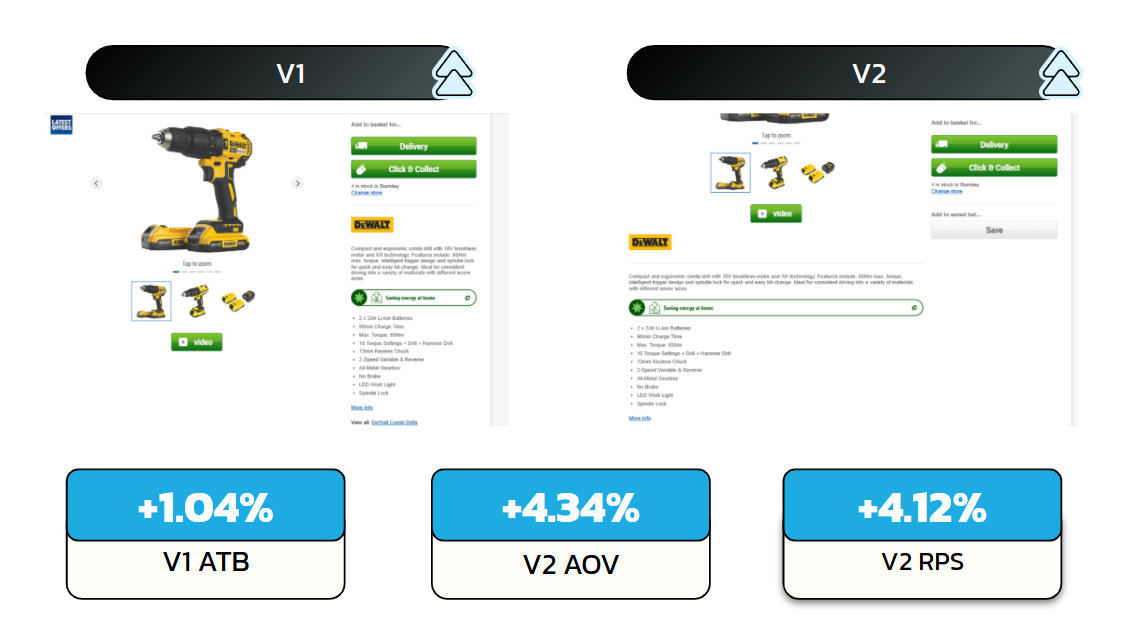
Result Add-to-bag +1.04% on the primary metric (97.5% significance), average order value +4.34%, revenue per session +4.12%, and a £8.75m annualised potential. A net revenue win.
The problem
On a trade-tools PDP, the imagery is the product. The host gallery was constrained, with no proper fullscreen inspection and an info layout that didn't give the images room to sell. Users couldn't examine what they were buying closely enough, and that shows up in basket value, not just clicks.
The hypothesis
If we give the PDP a richer, zoomable image experience and a clearer info layout, then average order value and revenue per session will rise, because users can inspect the product properly before they buy.
The solution
Rather than fight the host's Slick slider, the variation reads its images and builds a fresh gallery on top: a Flickity carousel, a fullscreen modal triggered from the main image, pinch-to-zoom on mobile via Hammer.js, the existing video and 360-spin features proxied into the new UI, and the desktop product info restructured around it. V2 took the info-layout change further.
Implementation
The build harvests the source slides, the host renders them in a Slick carousel, reads each image and its alt text, and feeds them into a custom Flickity gallery inserted ahead of the original.
// Read the host's slides, build a fresh gallery
const allImageSlides = mainImageSliderContainer
  .querySelectorAll('.slick-slide:not(.slick-cloned)');

allImageSlides.forEach((slide) => {
  const img = slide.querySelector('img');
  imageObject.mainImage.push({ img: img.getAttribute('src'), alt: img.getAttribute('alt') });
});

if (!document.querySelector(`.${ID}__mainSlider`)) {
  mainImageSliderContainer.insertAdjacentHTML('beforebegin',
    slider(ID, imageObject, cloneProductBadge, productName.textContent));
}
Pinch-to-zoom on mobile
Inside the fullscreen modal, each image gets Hammer.js pinch gestures, clamped between 1× and 4× so it can't be lost off-screen, with a double-tap to reset.
const mc = new window.Hammer(image);
mc.get('pinch').set({ enable: true });

let scale = 1, lastScale = 1;
mc.on('pinchstart pinchmove', (e) => {
  scale = Math.max(1, Math.min(lastScale * e.scale, 4)); // clamp 1x–4x
  image.style.transform = `scale(${scale})`;
});
mc.on('pinchend', () => { lastScale = scale; });
mc.on('doubletap', () => { scale = 1; lastScale = 1; image.style.transform = 'scale(1)'; });
Accessibility: keyboard and focus trap
The gallery is fully operable without a mouse. Each cell is a focusable button;
Enter or Space opens the fullscreen view, Escape closes it, and
a custom focus trap keeps Tab cycling inside the modal while it's open.
const trapFocus = (e, ID, modal) => {
  const focusable = Array.from(
    modal.querySelectorAll(`button, .carousel-cell, .${ID}__closeWrapper`)
  );
  if (e.key !== 'Tab') return;
  e.preventDefault();

  const first = focusable[0];
  const last = focusable[focusable.length - 1];
  const i = focusable.indexOf(document.activeElement);

  if (e.shiftKey) {
    (document.activeElement === first ? last : focusable[Math.max(0, i - 1)]).focus();
  } else {
    (document.activeElement === last ? first : focusable[Math.min(focusable.length - 1, i + 1)]).focus();
  }
};
Wiring the fullscreen trigger
Once Flickity has initialised, a static click on the main image opens the modal, and every cell is given keyboard parity and ARIA role so the same action works from the keyboard.
const flkty = window.Flickity.data(carouselElement);
flkty.on('staticClick', () => openModal(ID));

document.querySelectorAll('.carousel-cell').forEach((cell) => {
  cell.setAttribute('tabindex', '0');
  cell.setAttribute('role', 'button');
  cell.addEventListener('keydown', (e) => {
    if (e.key === 'Enter' || e.key === ' ') { e.preventDefault(); openModal(ID); }
    if (e.key === 'Escape') closeModal(ID);
    trapFocus(e, ID, carouselElement);
  });
});
Success metrics
Primary: average order value and revenue per session. Secondary: add-to-bag, gallery engagement, fullscreen and zoom usage, video and 360 engagement.
Post-test analysis
A win, and a net revenue gain. The primary metric was add-to-bag rate, and Variant 1 lifted it +1.04% at 97.5% significance, driven by desktop. Variant 2 carried the revenue: average order value +4.34% and revenue per session +4.12%. The small dip in conversion rate on both variants was not statistically significant, and was more than offset by the higher order values. In-test contribution was £1.19m, an annualised potential of £8.75m.
| Metric | Control | Variant 1 | Variant 2 |
|---|---|---|---|
| Add-to-bag rate | 16.88% | 17.05% | 16.94% |
| Average order value | £45.76 | £46.41 | £47.75 |
| Revenue per session | £3.88 | £3.89 | £4.04 |
| Conversion rate | 8.48% | 8.38% | 8.46% |
The behavioural signal was the interesting part. Users who engaged with the new zoom were measurably more likely to take high-intent actions: in Variant 1, logging in (+4.4%), searching (+2.7%), selecting a promotion (+4%) and adding collection items (+3.7%) all rose with statistical confidence. Letting people inspect the product properly didn't just move add-to-bag, it moved the behaviours that precede a considered purchase.
The split mapped cleanly to the build: Variant 1's add-to-bag lift came from desktop, where the larger gallery and sticky image had the most room to work; Variant 2's restructured product info beneath the gallery is what pushed order value. Two variants, two levers, one net revenue gain.