Radiator Super SKU
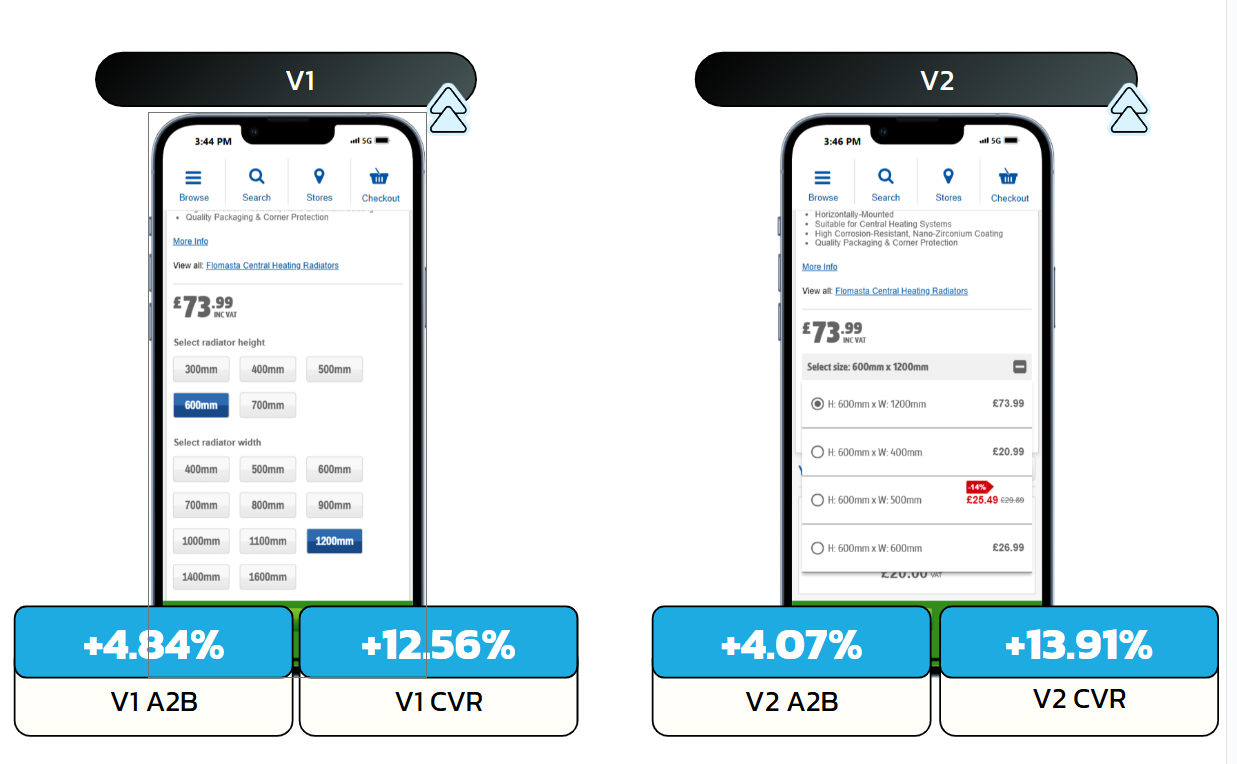
Radiators ship in dozens of height × width permutations, each its own SKU and its own product page. This test pulls every size of a given radiator onto one PDP, so a user who landed on the wrong dimension can switch to the right one without going back to search. Won, and held up across three separate runs.
Result Conversion rate +13.91%, average order value £110.81 (up from £102.42), and a £1.87m annualised potential. V2 implemented, and the win held across three separate runs.
The problem
A 600 × 1200 radiator and a 600 × 1400 of the same model were entirely separate product pages. Land on the wrong size, which Google Shopping and on-site search both make easy, and the only path to the right one was back out to search and start again. That round trip lost sales on a category where the decision is "this model, my size".
The hypothesis
If we surface every size permutation of a radiator on a single PDP, then add-to-bag and conversion will rise, because users can find and switch to the dimension they need without leaving the page.
The solution
Two variants of an in-page size selector, built entirely client-side over the host's Next.js PDP. V1 presents two lists, select a height, select a width, each linking straight to the matching SKU's page. V2 collapses that into a single dropdown of valid size combinations, with the live price of each variant fetched and shown inline so the user compares without clicking through.
Implementation
The variant set is derived from a reference map keyed by the current SKU: every related size with its width, height and URL. From the active product, the build computes the widths available at the current height and the heights available at the current width, deduplicates, and orders the live product first.
// Build the valid size set relative to the active product
const selectedProduct = mainProductData[currentSKU];
const widthsForActiveHeight = new Map();
const heightsForActiveWidth = new Map();

uniqueDimension.forEach(({ widthValue, heightValue, url }) => {
  const isCurrent = url.toLowerCase() === currentPageUrl.toLowerCase();
  // widths offered at the active height
  if (heightValue === activeHeight && (!widthsForActiveHeight.has(widthValue) || isCurrent)) {
    widthsForActiveHeight.set(widthValue, { width: parseInt(widthValue, 10), url });
  }
  // heights offered at the active width
  if (widthValue === activeWidth && (!heightsForActiveWidth.has(heightValue) || isCurrent)) {
    heightsForActiveWidth.set(heightValue, { height: parseInt(heightValue, 10), url });
  }
});
V2: live price hydration
The dropdown is injected first so it renders instantly, then each variant's current price is fetched from its own product page and dropped into the matching option. No new endpoint, no waiting on the slowest call before showing the control.
if (!document.querySelector(`.${ID}__variantDropDown`) && VARIATION === '2') {
  priceWrapper.insertAdjacentHTML('afterend',
    variantDropDown(ID, sortedPermutations, activeHeight, activeWidth));

  // hydrate each option with its live price
  getProductsData(sortedPermutations.map((p) => p.URL)).then((products) => {
    products.forEach(({ url, price }) => {
      document
        .querySelector(`.${ID}__optionsContainer a[href="${url}"]`)
        ?.insertAdjacentElement('beforeend', price);
    });
  });
}
Placement, state and tracking
The selector mounts after the quantity control on desktop and after the price on mobile, so it sits where size selection naturally belongs on each layout. The custom dropdown handles its own open/close and selected-state, and every interaction, opening the dropdown, choosing a size, height vs width list use, is tracked. The whole thing re-asserts on SPA route changes against the Tealium and Next.js data layers.
if (target.closest(`.${ID}__optionsContainer a`)) {
  fireEvent('user interacts with size variant');
  const { height, width } = clickedItem.dataset;
  wrapper.querySelector(`.${ID}__selectedText`).textContent = `Select size: ${height} x ${width}`;
  clickedItem.querySelector(`.${ID}__icon`).innerHTML = activeRadioButton;
  wrapper.classList.toggle('open');
}
Success metrics
Primary: conversion rate and add-to-bag rate. Secondary: size-variant interaction rate, and conversion of users who switched size in-page.
Post-test analysis
Winning variant (V2), implemented. The Super SKU lifted conversion rate +13.91% in V2 (+12.56% in V1) and add-to-bag up to +4.84%, but the decider was average order value: V2 reached £110.81 against control's £102.42. In-test contribution was £95,140, an annualised potential of £1.87m.
| Metric | Control | Variant 1 | Variant 2 |
|---|---|---|---|
| Conversion rate | 8.74% | 9.83% | 9.95% |
| Add-to-bag rate | 19.60% | 20.54% | 20.39% |
| Average order value | £102.42 | £103.30 | £110.81 |
| Revenue per session | £8.95 | £10.16 | £11.03 |
The two variants isolated why it worked. V1 surfaced the sizes as two lists; V2 added the live price of each size inline, and that one difference drove the result. Users interacted with V2's element less often, but each interaction was far more potent: add-to-bag after interaction was +69.7% on V2. Seeing a higher price beside a lower one creates an anchoring and loss-aversion effect, the user doesn't want to miss the better-value size. Product page views per session rose while PLP views fell: people were finding the right size on the page instead of bouncing back to search.
The result held up: the test was re-run twice more on the same concept, and both re-runs confirmed the win, a level of validation most single-shot tests never get.